Running an office near Dubai Digital Park or along Sheikh Mohammed Bin Zayed Road (E311) and still relying on a single shared PC or a consumer-grade router to store all your company files? That setup works fine for two people. Once you have five or more staff, shared drives slow to a crawl, user permissions become a guessing game, and a single hard drive failure can wipe months of work in seconds.
A proper Windows Server solution fixes all of that. And getting one installed and configured correctly in Dubai Silicon Oasis is far more straightforward than most business owners expect.
In this guide
- What Does Windows Server Installation Actually Involve?
- Why DSO Businesses Get More Out of a Windows Server Setup
- Which Businesses in DSO Actually Need This?
- The Typical Installation Process: From First Call to Go-Live
- What Affects the Cost of a Server Setup in DSO?
- How to Prepare Before the Engineer Arrives
- Questions to Ask Any IT Provider Before You Book
- Why Choosing a Local DSO IT Provider Makes a Difference
- Need Windows Server Installation in Dubai Silicon Oasis? Let’s Talk
- FAQ
What Does Windows Server Installation Actually Involve?
Windows Server installation is more than just plugging in a machine and pressing a button. It’s the process of building the central nervous system of your office IT, the one piece of infrastructure that controls who accesses what, where files live, and how your team works together. Microsoft Learn notes that a properly configured Windows Server environment underpins everything from file sharing and user authentication to remote access and application hosting.
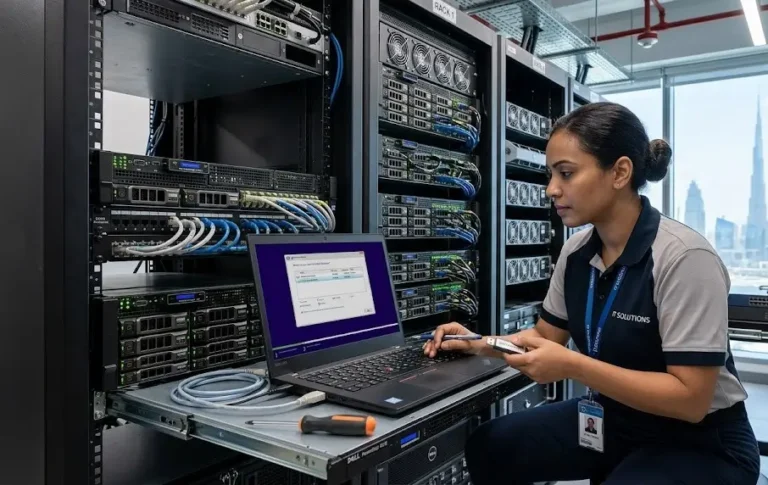
For a typical Dubai Silicon Oasis SME, a full installation covers several interconnected tasks. You install Windows Server 2022 or Windows Server 2025 on a dedicated server machine, configure Active Directory and a Domain Controller so each staff member logs in with their own secure credentials, set up shared drives and folder permissions so the accounts team cannot accidentally access HR files, and integrate the server with your existing office network. Printers, backup routines, and remote access via VPN often get configured in the same visit.
Why DSO Businesses Get More Out of a Windows Server Setup
Dubai Silicon Oasis is a free zone and integrated technology park that houses a dense mix of tech startups, engineering consultancies, trading companies, and corporate offices. Many of those businesses share a common problem: they outgrew their basic IT setup but have not yet formalised it. A Windows Server installation gives them the infrastructure to scale properly.
Here is what your business actually gets from a professional Windows Server setup:
- Centralised file storage: all company documents live on the server, not scattered across individual laptops, so nobody loses work when a device breaks.
- Active Directory user management: each employee gets their own login with access only to what they need, making onboarding and offboarding clean and secure.
- Shared printer and resource access: every device on the network can reach the office printer and shared applications without manual per-machine setup.
- Remote access and VPN readiness: staff working from home or from the Cedre Villas area can connect to the office server securely, as if they were sitting at their desk.
- A reliable backup foundation: with a server in place, you can run automated nightly backups to a Synology NAS or cloud destination, so a hardware fault never means a data catastrophe.
Need Windows Server Installation in Dubai Silicon Oasis?
Our engineer comes to your DSO office, installs and configures your server, and your team is up and running the same day.
Which Businesses in DSO Actually Need This?
Not every business needs a Windows Server right away, and it is worth being honest about that. If you have fewer than four or five staff and your file sharing needs are minimal, a cloud-only solution like Microsoft 365 Business Standard with SharePoint might be perfectly sufficient for now.
A dedicated Windows Server installation makes strong sense when any of the following apply to your office:
- You have five or more users who need to share files, a printer, or internal applications reliably.
- You handle sensitive data (client files, financial records, medical records) that requires controlled folder access and an audit trail.
- Your business runs software that must be hosted on a local server rather than the cloud, such as accounting packages, ERP systems, or CAD applications.
- You need staff in Academic City, International City, or Dubailand to connect remotely to a central office resource.
- You are already experiencing bottlenecks, slowdowns, or permission chaos on a peer-to-peer network.
The Typical Installation Process: From First Call to Go-Live
A professional Windows Server installation follows a clear, predictable process. Here is how it typically works when you book with Freelance IT Services Dubai for on-site work in DSO.

What Affects the Cost of a Server Setup in DSO?
Windows Server installation costs in Dubai vary based on several practical factors, and any provider who quotes a flat fee before understanding your setup is guessing. Here is what genuinely moves the price.
| Cost Factor | Why It Matters | Impact on Scope |
|---|---|---|
| Number of users | More CALs (user licences) needed | Moderate |
| Server hardware spec | RAM, storage, and CPU choice | High |
| Windows Server version | 2019 vs 2022 vs 2025 licensing | Moderate |
| Roles configured | File server only vs AD, DNS, DHCP, VPN | High |
| Data migration needed | Moving files from old systems | Moderate to High |
| After-hours requirement | Work outside business hours to avoid disruption | Low to Moderate |
Costs are always quoted in AED after a proper scoping call. There is no benefit to guessing at a number before seeing your setup. A quick call to 055 822 3165 takes five minutes and gives you a real, honest quote for your specific office.
Get a Quote for Your Windows Server Setup
Tell us your office size, user count, and what you need the server to do. We will give you a clear, honest quote in AED with no surprises.
How to Prepare Before the Engineer Arrives
A little preparation on your end can cut the on-site time significantly and reduce any disruption to your staff. None of this is technical. It is just practical.
- Know your user list: have a list of all staff who will need a domain login, their names, and the folders or applications they should be able to access.
- Identify your critical data: know where your most important files currently live so the engineer can plan any migration or backup before making changes.
- Check your existing network: if you have Cat6 structured cabling already in place, great. If you are running everything over Wi-Fi, let the engineer know so they can factor in a wired connection for the server.
- Plan for a short window of disruption: domain joining of each PC typically takes only a few minutes per machine, but it requires a restart. Planning the work for an early morning or after hours keeps staff unaffected.
- Confirm your licences: if you already have a Windows Server licence or Microsoft 365 subscriptions, have the product keys or account credentials accessible. See more on Windows Server 2022 licensing in Dubai if you are still deciding.
Questions to Ask Any IT Provider Before You Book
Choosing the right IT company for a server installation is worth a few minutes of due diligence. Here are five questions that separate a good provider from a mediocre one.
First: do you carry out the work on-site in Dubai Silicon Oasis, or do you subcontract it? On-site presence matters for server work. Second: will you provide documentation of the configuration after the job? Without it, any future engineer is flying blind. Third: do you handle the Microsoft Server licensing, or does the client need to source it separately? Fourth: what backup solution do you recommend alongside the server? A server without a backup plan is a risk, not an investment. Consider asking about server backup and disaster recovery as part of the same engagement. Fifth: do you offer ongoing support or an AMC after the installation?
Why Choosing a Local DSO IT Provider Makes a Difference
Server work is not something you want handed off to a remote team who has never seen your office. Physical access to the server, the ability to cable a machine directly, or to swap a faulty component on the spot, these things require someone in the room. A local engineer who knows the DSO area, can reach the DSO headquarters building or offices off Sheikh Mohammed Bin Zayed Road (E311) quickly, and has worked in similar free zone offices understands the practical realities of getting the job done without drama.
Freelance IT Services Dubai provides on-site Windows Server installation and configuration for offices across Dubai Silicon Oasis, including businesses in Academic City, Nad Al Sheba, International City, and Dubailand. Whether you are setting up a server for the first time or migrating from an old system, the same engineer who plans the job completes it. No handoffs, no confusion.
For businesses that want managed IT services in Dubai Silicon Oasis beyond the initial installation, ongoing support options are available to keep your server patched, monitored, and backed up every month.
Need Windows Server Installation in Dubai Silicon Oasis? Let’s Talk
If your office near the DSO headquarters or along Sheikh Mohammed Bin Zayed Road (E311) is ready for a proper server environment, the next step is simple. Call or WhatsApp 055 822 3165 to book your Windows Server installation and configuration in Dubai Silicon Oasis. A quick conversation about your office size and current setup is all it takes to get a clear, honest quote with no obligation.
The same Windows Server installation service is also available across Arabian Ranches, Al Satwa, Al Garhoud, Port Saeed, Dubai Media City, Bur Dubai, and all other areas of Dubai. Dubai Silicon Oasis is our focus here, but your location is never a barrier.
Book Your Windows Server Setup Near DSO Today
On-site engineer, full configuration, staff walkthrough, and honest pricing in AED. Serving offices across Dubai Silicon Oasis and surrounding areas.
FAQ
Keep exploring
- IT Support in Dubai Silicon Oasis
- Windows Server Installation & Configuration Dubai
- Server Backup & Disaster Recovery Dubai
Related services
More Windows Server Solutions in Dubai
Onsite help across Dubai for the problems that usually come next. Pick a service to see what is included.
 ServersWindows Server RDS Deployment in Oud MethaNeed Remote Desktop Services for your Oud Metha office? We deploy Windows Server RDS on-site near Wafi City and Sheikh Rashid Road.View service
  ServersDoes My Small Business Need a Server? Jebel Ali GuideNot sure if your office needs a server? We help SMEs near JAFZA and Ibn Battuta Mall pick and set up the right option.View service
  ServersWindows Server & Hyper-V in Jebel AliRunning multiple systems in Jebel Ali or JAFZA? We set up Windows Server and Hyper-V virtualization on-site, near Sheikh Zayed Road.View service


Swipe for more services
We cover every part of Dubai. See all areas we serve